

Prerequisites
Publish a script of the matching type first. You needscript-engine.manage or script-engine.admin to change Script Engine bindings, plus the relevant configuration permissions for the consuming form or workflow.
Connect the right caller
A script existing in the list is not enough. Check the published version, type, and consuming configuration when an operation does not invoke it.
A document event can also start a workflow, with no script involved. Workflow trigger or script hook compares the two and covers what changes if you move an existing hook into a workflow.
Configure an event hook
- Create and publish an
event_hookscript in Scripts. - Open Event Hooks and select the script from the left-hand list.
- Select a Document Type and Trigger Event, then choose Add Binding.
- Perform the matching document operation in your test environment and inspect the execution log and downstream result.
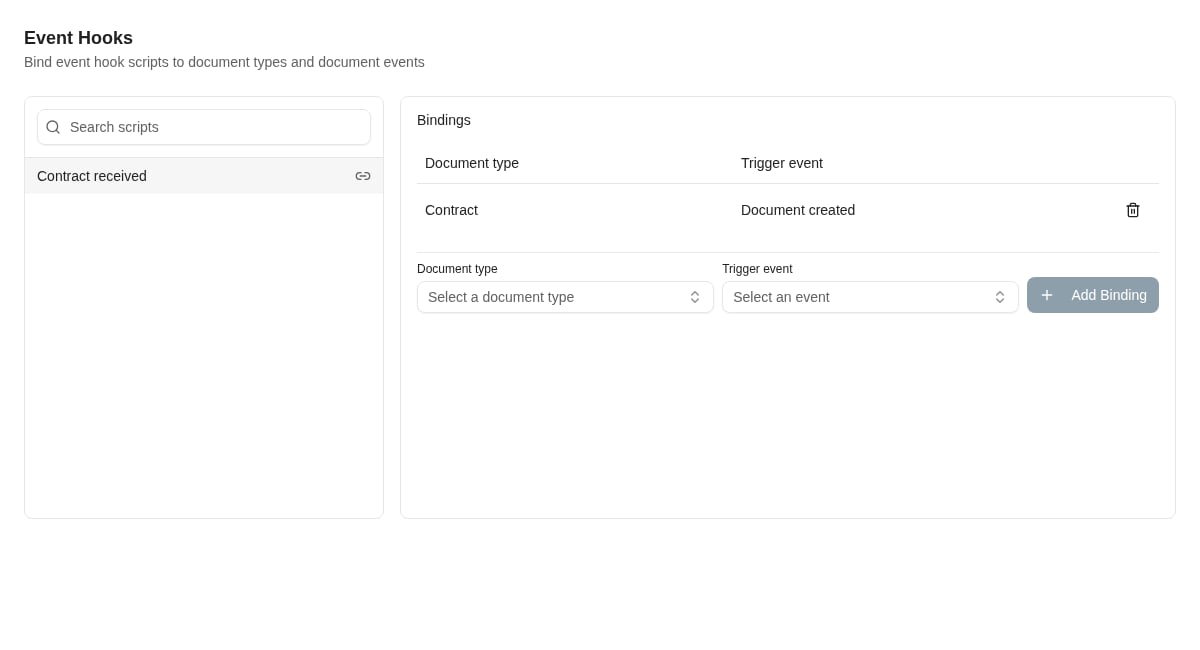
The Contract received event hook is bound to document creation for the Contract document type.
Understand the execution identity
Caseflow and external-autofill scripts use the caller’s identity for Insight callbacks. Document event hooks run in the background using a configured service account. Workflow script calls use the identity supplied by the workflow service. The event still includes the triggering username for attribution. That name does not mean the background callback executes with that person’s access. When a hook fails to read or update data, check the service account’s permissions with the person responsible for that account.Design for background processing
An event-hook input contains the event type and ID, timestamp, entity ID and type, triggering username, and payload. It returns an acknowledgement such as{"acknowledged": true}. It does not return values to the form that caused the event, and a later hook failure does not roll back the original document operation.
Use the event ID or another business identifier to avoid duplicate downstream work when events are delivered again. If a hook updates the same documents it subscribes to, define a condition that prevents its own update from causing repeated work. Test that condition before enabling a broad binding.
Remove a binding
Use the remove control beside the document type/event row and confirm. This disconnects that subscription; it does not delete the script, revert completed work, or cancel an execution already in progress.Where to read next
Variables, secrets and troubleshooting
Manage the settings and credentials scripts read, and investigate execution results without confusing saved code with published behavior.