

What an interaction rule does
A workflow trigger decides whether a workflow starts. An interaction rule decides what to ask first. When someone uploads a new document that matches the rule’s criteria, they see a question before the document is stored. Their answer travels with the document’sdocument.created event, and the workflow named in the rule starts with that answer already in its variables. The workflow can also test the answer in its trigger filter, so one answer can decide whether it starts at all.
Nothing happens until a rule exists and is enabled. A tenant with no rules uploads documents exactly as before.
Prerequisites
To open the section you needinteraction-rules.view and workflow-engine.view. To create, edit, or delete a rule you need interaction-rules.manage. interaction-rules.admin grants both. A user with view access alone can open a rule but not change it.
Interaction rules are part of the workflow engine, which is switched on per tenant. Where it is off, the Workflow settings — interaction rules included — do not appear; confirm it is switched on for your tenant before you begin. Once your user groups have features assigned under Settings → Admin Settings → Access → User Group Access, one of them also needs the Workflow feature; without it the section stays hidden, even with the permissions above.
Interaction rules depend on document events reaching the Workflow Engine. If the installation does not deliver document events, no question is asked and an enabled rule cannot be saved. On an installation that cannot store rules, the section shows Interaction rules are not available on this installation.
Publish the workflow before you write the rule. The workflow has to be:
- anchored to documents, with a
document.createdtrigger; - scoped to every document type the rule’s criteria can match;
- reading each variable the rule maps, as
$instance.<name>.
Where rules live
Open Settings → Admin Settings → Workflow → Interaction rules. The list shows each rule’s name, trigger point, workflow, order, and whether it is enabled. Rules are evaluated per trigger point, lowest order first, and every matching rule asks its question in that order. Give each rule its own order. The order of rules that share one is not defined — not the order they were created in — yet it decides which question is asked first, which answer a workflow’s filter reads, and which rule wins a variable name two rules map.Build a rule
Choose New interaction rule. The editor has four tabs.General
Criteria
The criteria tree is the same editor as retention policy criteria: rule types combined with AND, OR, and NOT groups, editable in the Visual Editor or the JSON View. The trigger point decides which rule types it can offer. A document upload is judged before the document exists, so the editor only offers what an upload knows: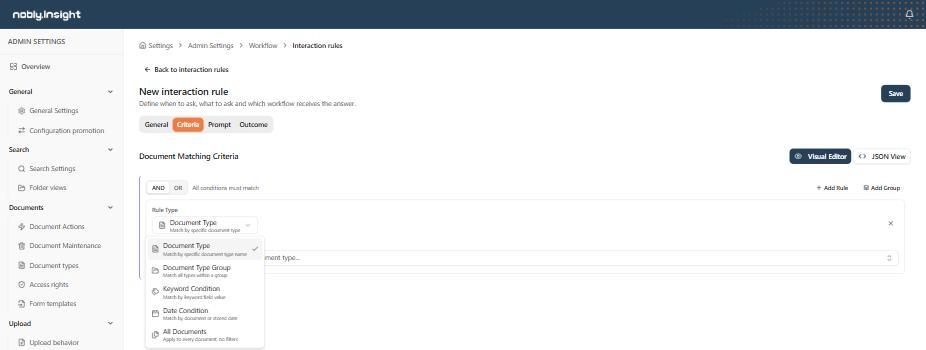
At the document upload trigger point, the rule-type menu offers only what an upload can evaluate.
Prompt
Each choice has a label, a value, and a style (primary, secondary, or destructive), and label and value are each up to 100 characters. The distinction matters: the label is what the person reads, and the value is what the workflow receives. Keep values stable and machine-friendly (
yes, no, later) and put the wording in the label — rewording a label then leaves your workflow conditions untouched. Two choices cannot share a value, even with different capitalisation.
Outcome
Each mapping row names a workflow variable and what it receives: the choice value or the choice label. An enabled rule needs at least one row, and a rule can map up to 50. Variable names use letters, digits, and underscores, and cannot start with a digit. The names of JavaScript’s built-in object members, such as
constructor, toString, and valueOf, are rejected, because a rule that maps one would break the interaction rule screens in settings.
What the person uploading sees
The question appears on the Upload page, including uploads started from Caseflow and the Office add-in.- They pick a document type and fill in keywords as usual.
- On upload, the file is transferred, and the enabled rules are evaluated against what they are about to store — document type, keyword values, and document date.
- If the file matches documents already stored, they are asked first whether it is a new document or a new revision. A new revision is stored without any question.
- Every matching rule shows its prompt, in order. The dialog names the file and shows one button per choice.
- The document is stored, and the answers travel with it.
How the answer reaches the workflow
The new document raises its normaldocument.created event, and the answers ride along. A new revision raises document.updated and never carries one.
For the workflow named in the rule’s outcome:
- The trigger filter can read
$interaction.value,$interaction.label,$interaction.ruleId, and$interaction.variables.<name>. $interactionis null when no answered rule named this definition, so a filter of$interaction.value == "yes"starts the workflow only on that answer, and never on an ordinary upload. Test for the answer you want —!= "no"also matches every document nobody was asked about.- The instance starts with the rule’s mapped variables already set, as text, readable as
$instance.<name>. - The filter editor suggests these references on a
document.createdtrigger, the only event that carries an answer, and marks them as unknown on any other. It cannot know the variable names a rule maps, so it also marks$interaction.variables.<name>as unknown. The filter still saves and publishes — check that name against the rule’s outcome yourself.
$interaction is the earlier rule’s answer, while the instance receives the variables of both. Where both map the same variable name, the earlier rule in evaluation order wins.
A rule’s outcome names a workflow, but the workflow’s own trigger and filter still decide whether it starts. A brand-new document normally has no instance of that workflow yet. The exception is a workflow that something else — another of its triggers, or a
Workflow.Start step in another workflow — has already started for the new document before its document.created event is handled. Only one instance of a workflow runs per document at a time, so the answer then starts nothing.Change and remove rules
- A rule is saved against the version you opened. If someone else saved it meanwhile, the editor says Someone else changed this rule and offers to reload; reloading discards your edits, and a failed reload keeps them.
- A deleted rule stops applying immediately. If someone is answering its question at that moment, storing their document is refused. The upload then checks the rules once more and asks again every question that now applies, including the ones already answered; when no rule applies any more, the document is stored without an answer. The same happens when a rule is disabled, or changed so that an answer no longer fits it.
- Every change to a rule is recorded in the configuration audit log.
- Disabling a rule is the reversible way to stop asking a question while you re-word it. Deleting a rule cannot be undone from the settings screen.
Where to read next
Ask before creating a case object
A worked example: react to a document type with an empty keyword, ask the uploader, and create a Caseflow object on yes.
References & expressions
The trigger-filter references an interaction answer exposes, and how mapped variables are read.
Building workflows in the designer
Trigger types, scope, and the gates an event passes before an instance starts.