

What document access rights control
Document access rights decide what each user group can do with documents of a given document type — view them, create them, modify keywords, delete, print, mail, manage revisions, and more. They are the layer that governs day-to-day work with documents, granted per document type and per user group.Document access rights are different from application permissions. Application permissions decide who can use the admin and configuration screens; document access rights decide what users can do with documents themselves. A user typically needs the right document access rights to do their job, and only administrators need application permissions. See Permissions & access for the full model.
- By document type — pick a type and set every group’s privileges on it.
- By group — pick a user group and see, across all document types, what it can do.
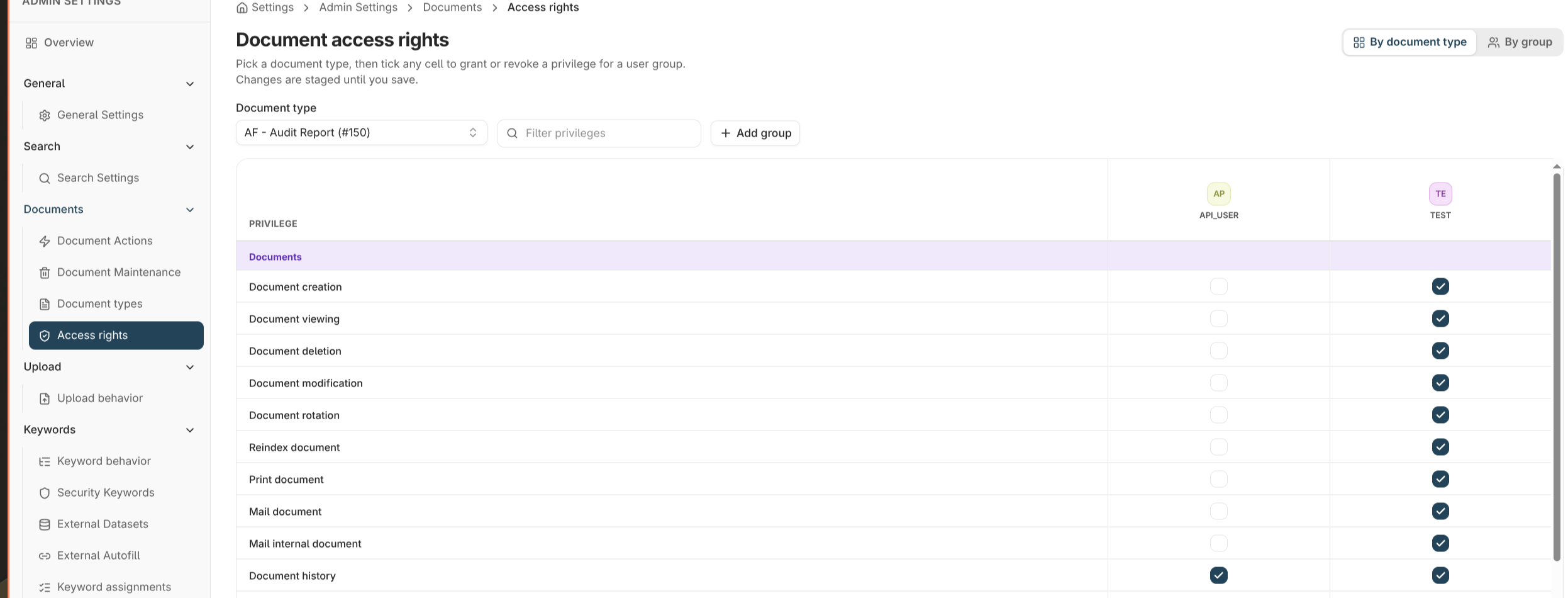
The privileges
Privileges are grouped into three categories. Grant only what each group needs.Documents
Keywords
Revisions & versions
Granting access
- Open Admin settings → Documents → Access rights and choose the by document type or by group view.
- Select the document type (or group) to edit.
- Tick the privileges each group should have. Changes are held as a draft.
- Save to apply, or Discard to revert.
Bulk grant
To give a group a common set of privileges across many document types at once, use Bulk grant. Pick a privilege set — for example a read-only or contributor preset — and apply it to several types in one action, instead of editing each type individually.Where to read next
Permissions & access
How document access rights fit into the wider access model alongside application permissions and security keywords.
Document types
The document types whose access you’re granting.