

Variable administration
Variables hold the plaintext settings a script reads, such as a base URL, an ID or an environment name. You needscript-engine.admin to open Admin settings → Script Engine → Variables.
Create a variable with a Key name, value, description, and scope. A key name uses letters, digits, and underscores, and does not start with a digit, for example Partner_Api_BaseUrl. Workflow environment variables follow the same rule, so a name you use in both places is valid in both. Leave the scope at All scripts, or choose a script when only that script needs the value. At runtime, scripts read the value from context["variables"] using the key name:
Secret administration
You needscript-engine.admin to open Admin settings → Script Engine → Secrets. Script management alone does not allow secret administration.
Create a secret with a Key Name, value, description, and scope. Choose a specific script when only that script needs the credential; Global makes it available to all scripts. At runtime, scripts obtain the value from context["secrets"] using the key name.
The list returns secret metadata, not stored values. To rotate a value, edit the entry and supply its replacement. Key names are unique across the secret store, including script-scoped entries; use distinct names for distinct credentials.
Deleting a secret removes it from future execution contexts. Review dependent scripts before deleting or changing its scope. Changing a credential here does not revoke it at the external provider.
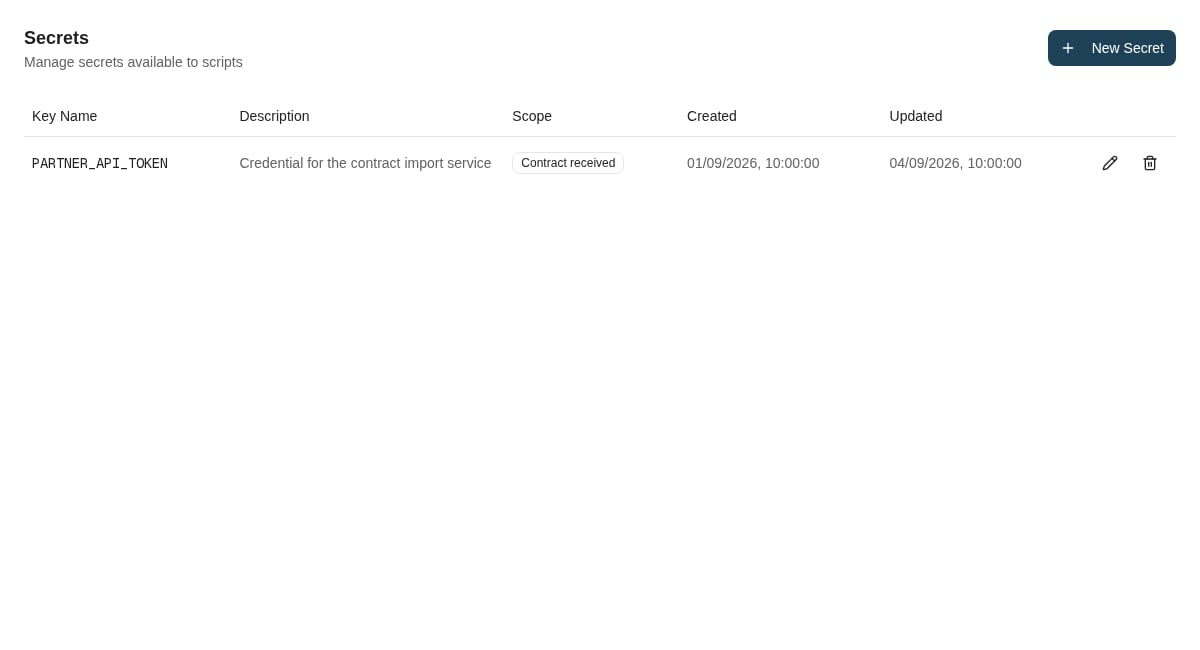
Secret metadata shows the script scope without exposing a stored credential.
Call an API that uses OAuth client credentials
Many partner APIs expect a bearer token that you first request from an OAuth token endpoint with a client ID and client secret. Keep the token URL, client ID and audience or scope in variables, and the client secret in a secret. You needscript-engine.admin to manage both. Then call context["http"].client_credentials_token(...) right before each request, instead of requesting the token yourself.
This Workflow Action (workflow_action) reads a claim from a partner API whose tokens come from Auth0, which identifies the API by an audience:
HttpError is available in every script without an import. Its status_code is the HTTP status the API answered with.
The Script Engine keeps the token and gives the same one to every script and run that uses the same credentials, until shortly before it expires and for at most 24 hours. Runs that start at the same time share one token request. You therefore see a token request each time the token nears expiry, not one per run. The token is kept in memory only: after the Script Engine restarts, for example after an update, the first call requests a new token. If your environment runs the Script Engine on more than one server, each server requests its own token.
- Changing the secret, audience, scope, token URL or client ID gives a new token at the next run.
- A failed token request is not remembered: the next call that needs a new token tries again. A token whose reply does not say when it expires (
expires_in) is used for that call but not kept. - If the API answers 401, request a token again with
force_refresh=Trueand retry once, as the example does. You get a fresh token, or the one another run has just fetched. For the same credentials, a forced refresh requests a new token at most once every 30 seconds; within that time you get the current one. If the forced request fails, the kept token stays in use. force_refresh=Truereplaces only a token that the same run has already received. As the first call in a run it returns the kept token, so callclient_credentials_tokennormally first, as the example does.- A permission or role that you grant the client at the provider, without changing the secret, audience or scope, reaches your scripts only when the kept token expires (up to 24 hours for providers that issue day-long tokens, as Auth0 does by default) or after a forced refresh. The example passes a 403 on as an error. Treat 403 like 401 (write
if e.status_code not in (401, 403):instead ofif e.status_code != 401:) only for an API whose 403 always means that the client lacks a permission or role, and preferably only while you roll out such a change. Never do it for an API that also answers 403 when it refuses a single record, such as a claim this client may not see: every such answer can then request a new token, up to one every 30 seconds for the same credentials, instead of one each time the token nears expiry. - If no token is obtained, the call raises
HttpErrorwith a message that starts withToken request failed:. Itsstatus_codeis the token endpoint’s status, orNonewhen no reply arrived: a timeout, a network failure, or a destination that is not allowed. An invalid argument raisesValueError, and the message names the argument. So does a run that obtains tokens for more than eight different sets of credentials: the ninth set raisesValueError. - The token endpoint must use HTTPS and, like every
context["http"]call, be one of the environment’s allowed destinations. - Never log, print or return the token, and never put it in a URL.
scope instead of audience. Only the token function in the example changes:
auth_method="client_secret_basic".
Inspect execution logs
Withscript-engine.view or a higher Script Engine permission, open Admin settings → Script Engine → Execution Logs.
Filter by success/failure, user, or date interval, then apply the filters. The current type dropdown offers the Caseflow types; leave it at All when investigating event hooks or workflow actions. Use Load More for older results.
Open a row to inspect the script and version IDs, type, entity ID, execution mode, user, duration, time, error, and correlation ID when present. Input and output details appear only when payload capture is available; their absence does not mean the script received no input.
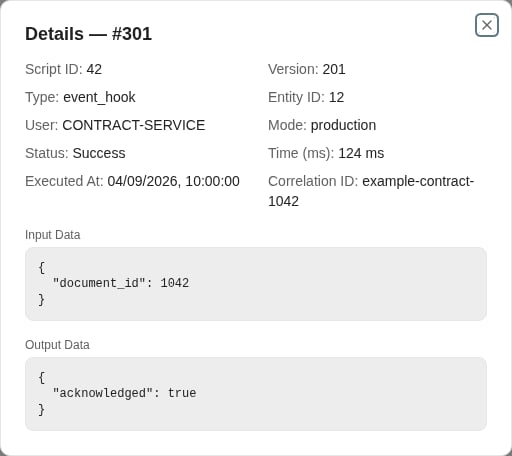
An execution detail identifies the script version, caller, status, correlation ID, input, and output.
Diagnose by symptom
When escalating, include environment, time, script slug and executed version ID, entity ID, correlation ID if shown, and the operation that triggered it. Exclude credentials and unnecessary business data.
Where to read next
Introduction to Workflows
Understand how the Nobly Insight workflow engine automates document and case processes — definitions, triggers, nodes, actions, and tasks.