

What an autofill keyword set does
An autofill keyword set is a look-up table that fills several keywords at once during indexing. A user enters the primary keyword and Nobly Insight fills in the related keywords from the matching row — pick a Customer number and the Customer name and Address appear automatically. Autofill sets speed up data entry and keep related values consistent. They don’t change which keywords a document type has — they populate keywords that are already assigned. Manage them under Admin settings → Keywords → Autofill sets (open Admin settings from your profile menu at the bottom-left of the sidebar). The list shows each set’s primary keyword, its other members, the user groups that can use it, and how many value rows it holds.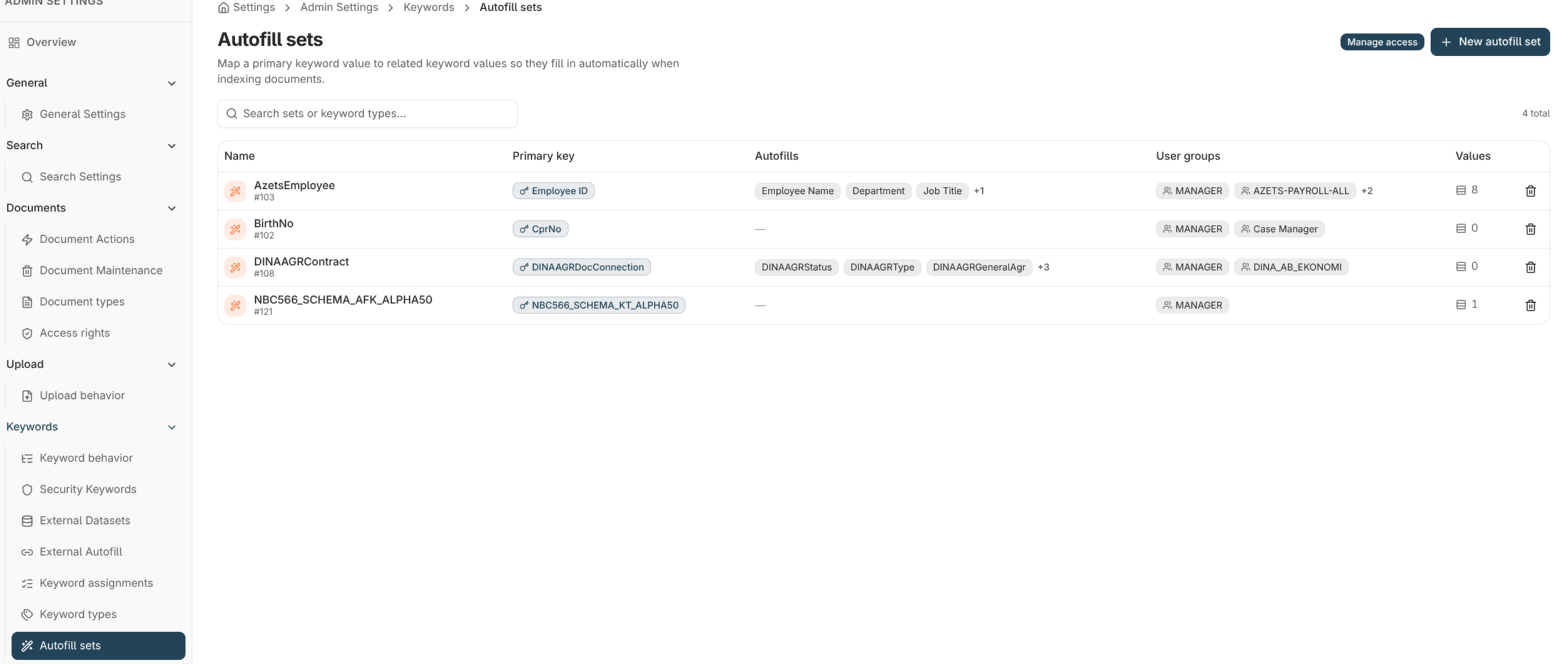
How a set is built
Creating a set
- Open Admin settings → Keywords → Autofill sets and choose New autofill set.
- Name the set and choose the primary keyword, then the member keywords that will be filled in.
- Choose the user groups that may use it.
- Add values — each row pairs a primary value with the values for the members.
Managing members and the primary keyword
- Add or remove members to change which keywords the set fills.
- Change the primary keyword to look the set up by a different field. Every row must already have a value for the new primary, so the look-up stays unique.
Internal and external sets
Some autofill sets are external — their values come from an outside source rather than being typed in Nobly Insight. External sets are read-only here: you can see them and use them for indexing, but their values and membership are maintained at the source, not on this screen.Deleting a set
Deleting an autofill set removes the set and all its look-up values; it requires the Keyword Configuration Administration permission. A set can’t be deleted while it’s still assigned to a document type — remove the assignment first. Deleting a set does not delete the keyword values already stored on documents.Where to read next
Autofill on edit
Bind the set to a keyword group so editing any keyword in the group re-runs the look-up.
Keyword types
Define the keyword types an autofill set looks up and fills in.
Keyword assignment models
Make sure the keywords an autofill set fills are assigned to the document type.