

Prerequisites
You needworkflows.manage to build and publish workflows. The editor’s Testing tab needs workflows.test, and its Settings tab needs workflows.settings. Agree on the incoming items the workflow receives and build its document mapping first, so that the workflow can name it.
The workflow list
Open Workflows. The list shows each workflow’s data type, when it was last changed, and which version runs.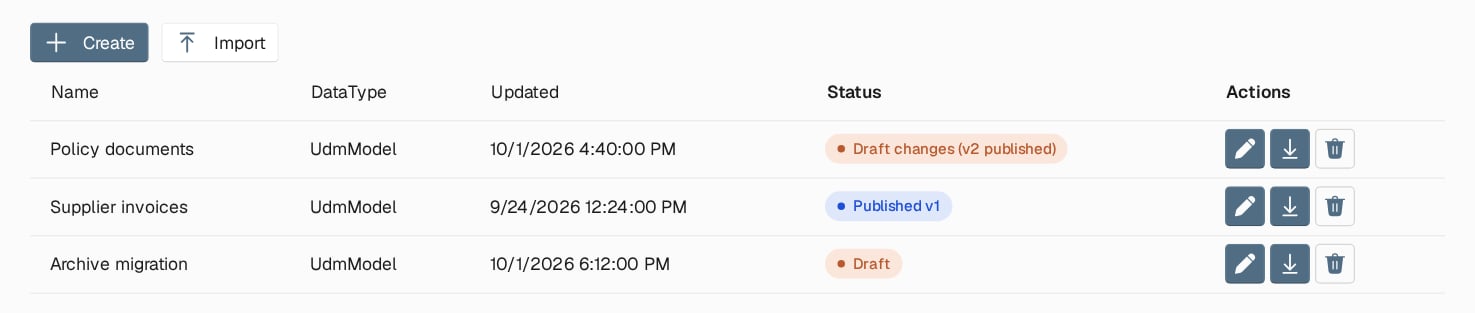
Three workflows: one with unpublished draft changes, one whose draft matches its published version, and one that has never been published.
Choose Create, enter a Name, and choose the
UdmModel data type, which every new workflow uses. Sending systems address the workflow by its name, so agree on it with them. Each row can be opened in the editor, downloaded as JSON, or deleted.
The editor
The editor has three tabs: Editor, Settings and Testing. The Editor tab holds the toolbar, the step palette on the left, the canvas, and a side panel with the selected step.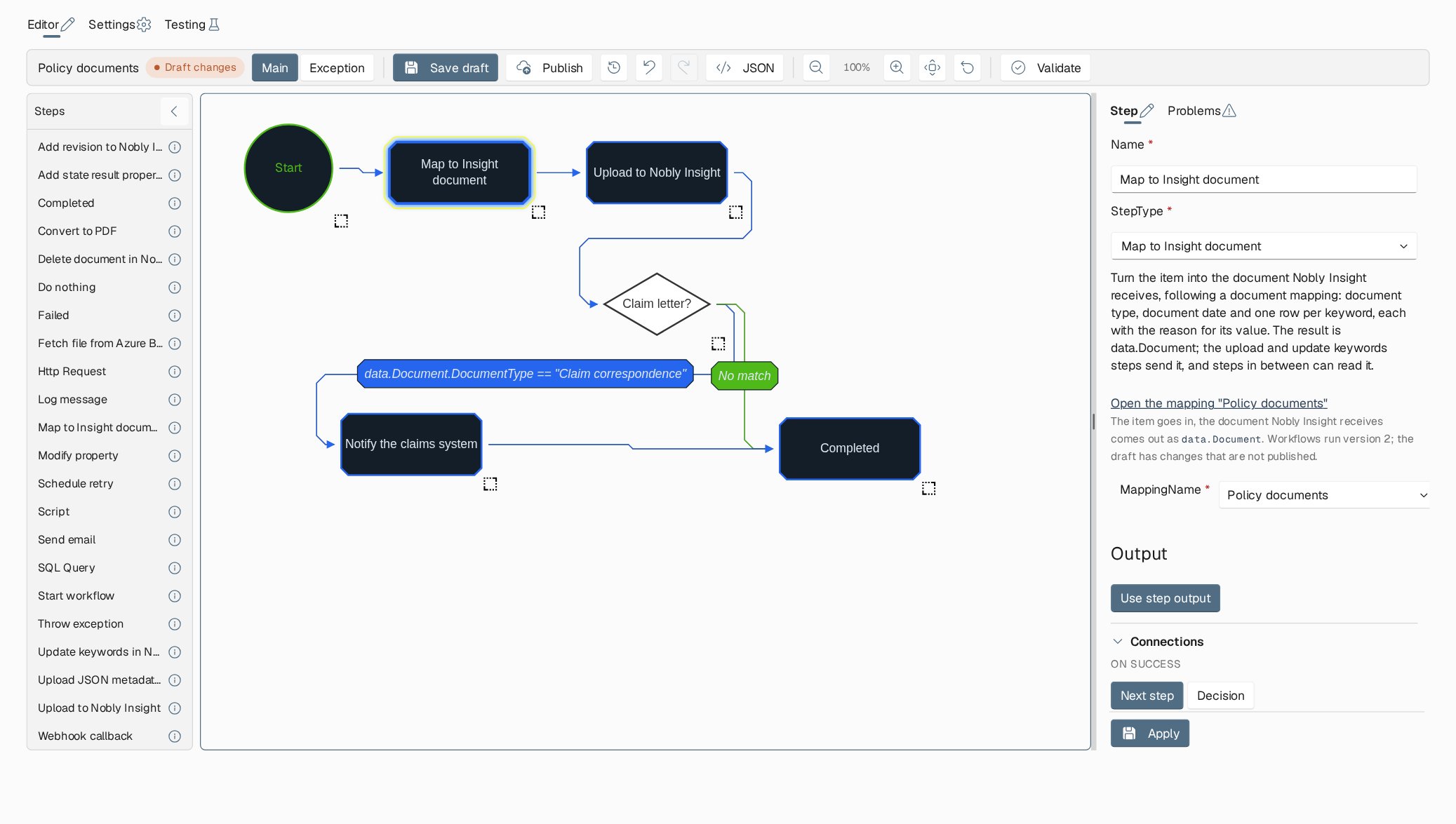
The Policy documents workflow. The Map to Insight document step is selected, and the side panel shows its mapping. After the upload, a decision sends claim letters to a webhook callback before the run completes.
- the workflow’s name and status
- Main and Exception, to switch between the two flows
- Save (Save draft once the workflow has been published)
- Publish
- Published versions
- undo and redo
- JSON
- zoom
- Validate
Add and connect steps
Click a step in the palette to add it in the middle of the canvas, or drag it to where you want it. The new step opens in the side panel. The step reference describes every step. To connect two steps, hover over a step and drag its connection handle to the next step. Right-click a step for Set next step, Set next step on exception, Set as start and Delete step. Right-click the empty canvas for Create step and Create decision. The run begins at the step connected to Start. If the two disagree, validation tells you to use Set as start.Configure a step
The Step tab of the side panel shows the step’s Name, its StepType, a description, and one row per input. Required inputs are marked with*. The information icon shows what the input expects.
Most inputs let you choose how the value is given:
Inputs with a fixed set of choices, such as a mapping name or an HTTP method, show a list instead. Some steps also produce an output. Choose Use step output to make it available to later steps as
data.StepOutput, until another step sets its own output.
Edits in the panel stay in a working copy until you choose Apply. Apply checks the inputs, including whether each expression compiles and returns the expected type. If you save or publish with unapplied edits, the editor asks whether to continue without them.
Branch with a decision
Under Connections, On success is either Next step or Decision. A decision has a Decision label and one branch per target step, each with a condition, plus Otherwise for when no branch matches.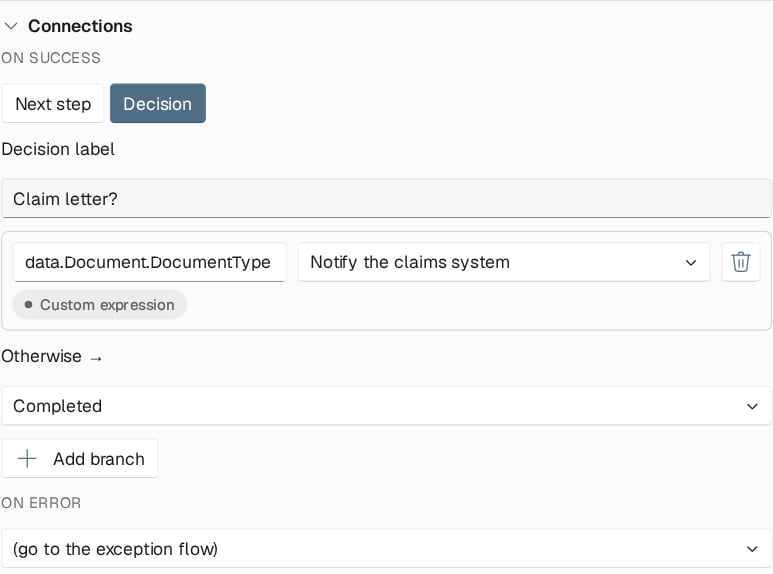
A decision after the upload: claim letters go to the webhook callback, everything else to Completed.
true or false; choose Edit the raw C# expression to write one. A branch without a condition is dropped when you save.
At run time, exactly one branch condition may be true. If none is true, the run follows Otherwise. Two true conditions, or no true condition without an Otherwise, is an error, and the run takes its error path. Write conditions that exclude each other.
Handle errors with the exception flow
When a step fails, the run continues as follows:- If the step has its own On error target, the run goes there. The target is always a step in the main flow.
- Otherwise, if the workflow has an exception flow, the run starts at that flow’s first step. The error is available to its steps as
data.Exception. - Otherwise, the run is marked Failed.
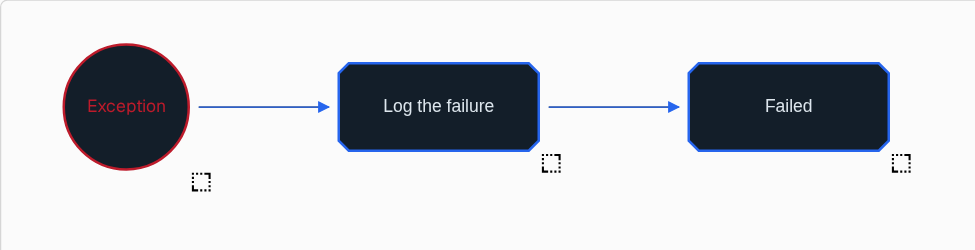
An exception flow that logs the error message and marks the run as failed with it.
End the run
Every path should end in a step that sets the run’s final state:- Completed finishes the run and removes its temporary file.
- Failed finishes the run with a reason.
- Schedule retry sets the run to retry later from the start or from the last step, and fails it once the maximum number of retries is used up.
Expressions
Inputs, outputs and conditions can be C# expressions over the workflow data. Common building blocks:datais the item and what earlier steps added, for exampledata.GetPropertyValue("CustomerNo")ordata.Document.DocumentTypeafter a Map to Insight document step.global["NAME"]reads a global variable.data.StepOutputis the previous step’s output.
"Invoice", not Invoice. Use Literal mode for fixed values.
Edit expression opens a code editor with completion, signature help, hover information, and errors underlined as you type. Its tabs list the Data type members, the Global variables, and the available Methods. The Test tab runs the expression against a workflow test case or pasted sample data, if you hold workflows.manage or mappers.manage.
Expressions run as code with the environment’s identity. See the warning in Access and permissions before you grant the right to write them.
Edit a flow as JSON
JSON opens the current flow’s steps in the same format as a downloaded workflow file. Use it to copy steps between workflows or to make many similar edits at once. Check validates the JSON without applying it. Apply to canvas replaces the flow’s steps as one change that Undo reverts. The canvas keeps its layout when the steps and their connections are unchanged, and is laid out again otherwise. Nothing is saved until you save the draft.Validate, save and publish
Validate checks the whole workflow and lists errors and warnings on the Problems tab. Select a problem to jump to its step. Errors block publishing. Warnings point at things that will probably fail at run time, such as a missing required input or a global variable that does not exist. Save stores the draft. You can save a draft that still has errors, after confirming. Publish saves pending changes if you agree, validates the draft, and asks you to confirm. It then records the draft as a new numbered version. From then on, new items run that version. A full rerun of an earlier run also runs it; see rerun modes. Publish the mappings a workflow names before you publish the workflow. A workflow test runs the draft workflow with the draft mappings, so test before you publish; see Testing workflows.Published versions
Published versions lists every version with its publication date and publisher. The current one is marked. View shows a version’s definition. Restore to draft copies a version into the draft without changing the published version. Test the restored draft, then publish it to make it current.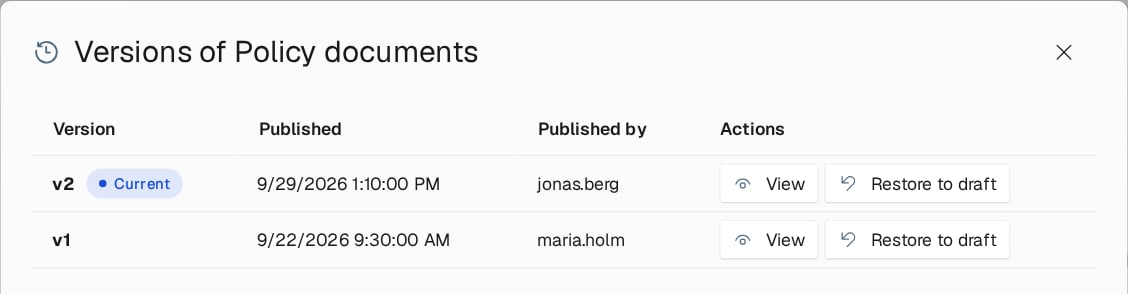
Published versions of Policy documents. Version 2 is current; version 1 can be viewed or restored to the draft.
Workflow settings
The Settings tab sets the Nobly Insight upload request limit: how many uploads this workflow may run against Nobly Insight at the same time, from 1 to 30. Lower it when a large batch competes with interactive users. Coordinate a higher limit with the people responsible for Nobly Insight’s capacity, and don’t raise it to hide failures. The System page sets the limit across all workflows.Export and import
Download as JSON in the workflow list saves a workflow’s definition. Import loads one or more definition files, and lets you rename each before saving. After you import into another environment, check what the workflow refers to: the mappings it names, global variables, shared lookup tables, and the endpoints of the systems it calls. An export holds one workflow’s definition, not its mappings or variables, so it is not a backup of the environment.Where to read next
Step reference
Every step the editor offers, grouped by purpose, with the inputs that matter and the steps that remain only for older versions.