> ## Documentation Index
> Fetch the complete documentation index at: https://docs.insight.nobly.dk/llms.txt
> Use this file to discover all available pages before exploring further.
# Users and user groups
> Inspect account status, manage local accounts and group membership, and distinguish Insight administration from federated identity management.
## Prerequisites
Open **Admin settings → Access → Users** or **User groups**. You need `iam.users.view` to inspect users and `iam.users.manage` to change them. Group administration uses `iam.user-groups.view` and `iam.user-groups.manage` respectively. Granting application permissions is a separate capability, described in [Managing permissions](/permissions/managing-permissions).
## Choose the account lifecycle
| Account | Where you manage its lifecycle |
| ----------------------------------- | ------------------------------------------------------------------------------------------------------------------------ |
| Federated person | Your identity provider controls sign-in and role assignments; Insight provisions and synchronizes the account at sign-in |
| Locally managed interactive account | Insight's Users screen; intended for cases that still need username/password sign-in |
| Service user | A dedicated account for an integration, with groups carrying its required rights |
| Managed API client | [API clients](/integrations/api-clients) creates the machine identity, dedicated service user, and group together |
Use federation for new people. Creating a service user in **Users** does not by itself create an OAuth client or issue client credentials.
## Inspect a user
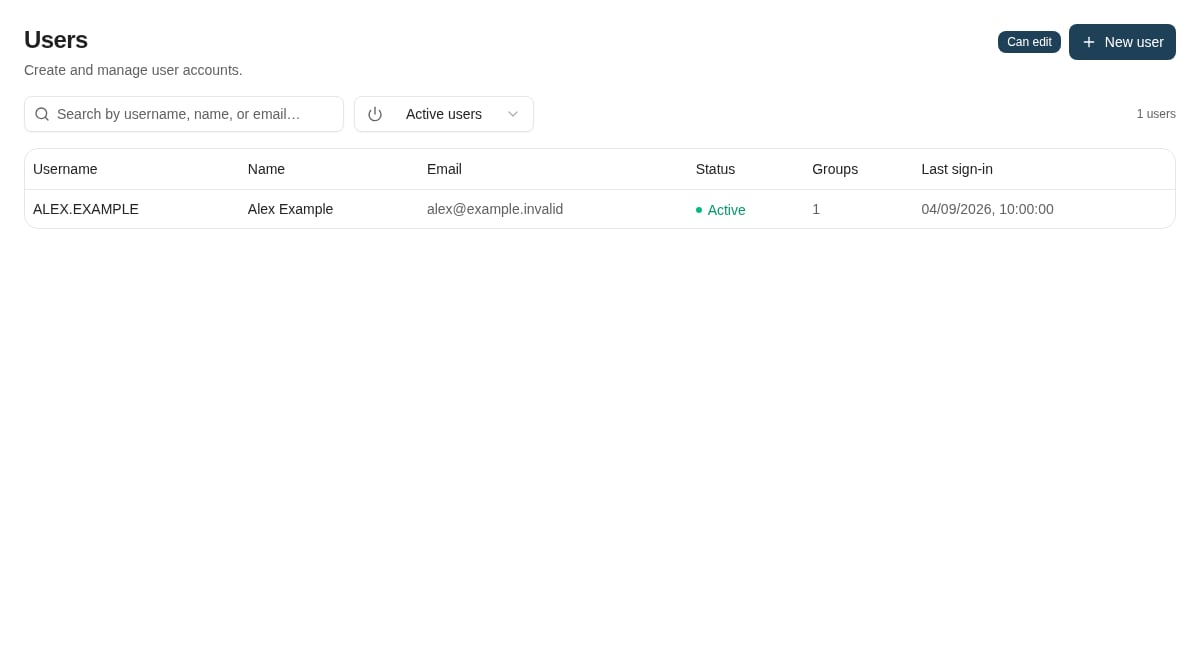
Search **Users** by the available identity fields. The list initially excludes disabled accounts; include them when investigating an account that appears to be missing.
Open a user to inspect:
* **Profile**: full name, email, and phone details.
* **Account status**: active/disabled, lockout and password-expiry indicators, failed sign-ins, and last sign-in where available.
* **Group membership**: the groups the account belongs to.
* **Effective permissions**: permissions combined from its groups.
A successful sign-in is not proof of document access. Check application permissions, document-type rights, security keywords, and Caseflow access as applicable.
 ## Maintain membership
Add the user to an appropriate existing group, or remove an obsolete membership. Review the combined permissions after the change: removing one group does not remove a capability still granted by another group.
For federated people, make durable membership changes in the identity provider's role assignments. Sign-in synchronization can replace a manual Insight membership change. Profile fields synchronized from the provider can also be refreshed at sign-in.
Do not assume an already open browser or an issued integration token refreshes immediately. Sign in again and recheck the effective access when validating a change; coordinate urgent access removal with the identity administrator.
## Local account actions
Use **New user** only when local creation is appropriate. Choose **Service user (M2M)** for an independently provisioned integration account, or **Interactive user** for a supported password-sign-in case. Select the required groups. The service-user mode generates a password required by account creation, but client-credentials sign-in uses the integration's client credentials instead.
Use **Unlock** for a locked account after investigating the failed sign-ins. **Reset password** changes the locally managed credential; it does not reset a federated user's work-account password.
Use **Disable** to stop a locally managed account's access and **Enable** to restore it when appropriate. The Users UI deliberately provides disabling instead of permanent account deletion. A change that would remove the last effective permission administrator is blocked; establish another valid administrator before removing that access.
## Maintain user groups
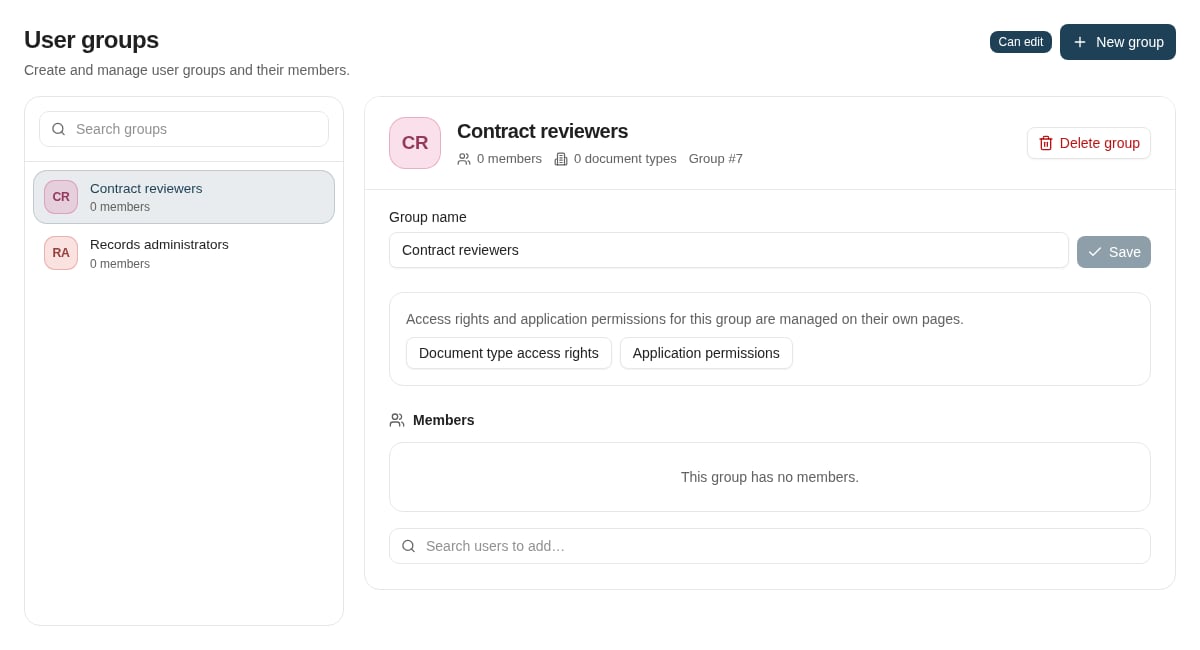
Create groups around a concrete access responsibility and review both their members and their permission grants. Granting an application permission does not automatically grant document access rights.
Deleting a group can be blocked by members, document-type assignments, autofill sets, security-keyword references, or the last-administrator safeguard. Read the conflict details and remove or replace the dependencies deliberately before retrying. Do not treat a dependency conflict as an instruction to delete the underlying business configuration.
## Maintain membership
Add the user to an appropriate existing group, or remove an obsolete membership. Review the combined permissions after the change: removing one group does not remove a capability still granted by another group.
For federated people, make durable membership changes in the identity provider's role assignments. Sign-in synchronization can replace a manual Insight membership change. Profile fields synchronized from the provider can also be refreshed at sign-in.
Do not assume an already open browser or an issued integration token refreshes immediately. Sign in again and recheck the effective access when validating a change; coordinate urgent access removal with the identity administrator.
## Local account actions
Use **New user** only when local creation is appropriate. Choose **Service user (M2M)** for an independently provisioned integration account, or **Interactive user** for a supported password-sign-in case. Select the required groups. The service-user mode generates a password required by account creation, but client-credentials sign-in uses the integration's client credentials instead.
Use **Unlock** for a locked account after investigating the failed sign-ins. **Reset password** changes the locally managed credential; it does not reset a federated user's work-account password.
Use **Disable** to stop a locally managed account's access and **Enable** to restore it when appropriate. The Users UI deliberately provides disabling instead of permanent account deletion. A change that would remove the last effective permission administrator is blocked; establish another valid administrator before removing that access.
## Maintain user groups
Create groups around a concrete access responsibility and review both their members and their permission grants. Granting an application permission does not automatically grant document access rights.
Deleting a group can be blocked by members, document-type assignments, autofill sets, security-keyword references, or the last-administrator safeguard. Read the conflict details and remove or replace the dependencies deliberately before retrying. Do not treat a dependency conflict as an instruction to delete the underlying business configuration.
 ## Where to read next
Sign in to Nobly Insight with your organisation's own identity provider over OpenID Connect — Microsoft Entra ID, Okta, Auth0, and other OIDC-compliant providers.
## Where to read next
Sign in to Nobly Insight with your organisation's own identity provider over OpenID Connect — Microsoft Entra ID, Okta, Auth0, and other OIDC-compliant providers.