> ## Documentation Index
> Fetch the complete documentation index at: https://docs.insight.nobly.dk/llms.txt
> Use this file to discover all available pages before exploring further.
# How to use a reporting dashboard
> Open a shared dashboard, filter its date range, explore results, and check how current the data is.
## Open a shared dashboard
Open **Reporting** and select a dashboard shared with one of your groups. You need dashboard-view permission as well as access through the sharing configuration.
Read the dashboard's title and purpose before interpreting its figures. Dashboards use captured data-source snapshots, so their numbers are not necessarily a live query of every document.
## Choose the period and inspect a chart
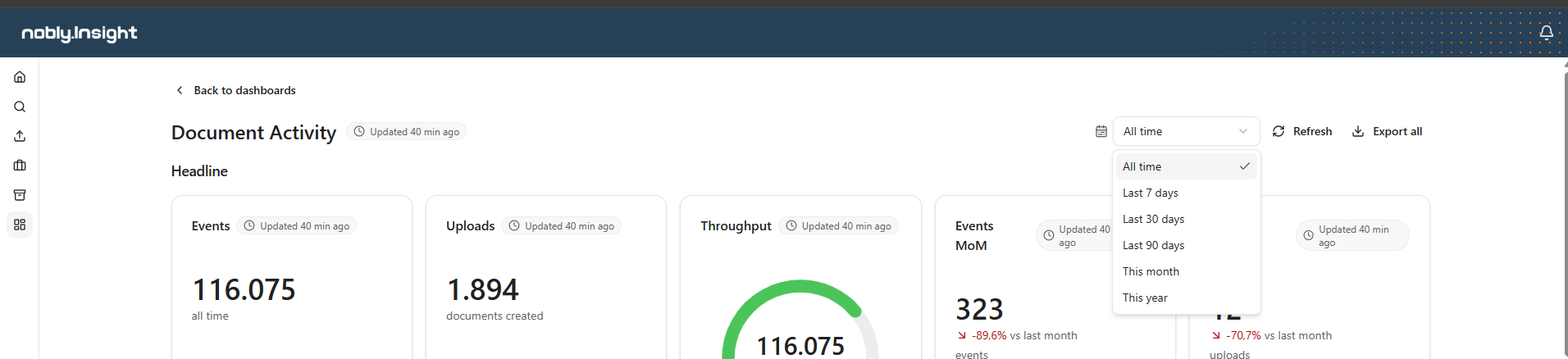
Use the dashboard date controls when they are available. Check the selected period and let the dashboard refresh its display. Different elements can use their configured date columns.
Select a chart segment or other interactive element when drilldown is configured. Read the resulting detail and filters before treating it as the whole population.
 ## Check freshness and export
Inspect refresh information before using the result for a time-sensitive decision. Refreshing the view and refreshing an underlying data source are different operations.
Use the offered export control when you need a copy. Keep the date range, dashboard purpose, and snapshot timing with the exported result so it can be interpreted later.
See [dashboard viewing reference](/reporting/viewing-dashboards) for header controls, drilldowns, and export details.
## Where to read next
Documentation for the Nobly Insight platform — AI-powered document intelligence and collaboration.
## Check freshness and export
Inspect refresh information before using the result for a time-sensitive decision. Refreshing the view and refreshing an underlying data source are different operations.
Use the offered export control when you need a copy. Keep the date range, dashboard purpose, and snapshot timing with the exported result so it can be interpreted later.
See [dashboard viewing reference](/reporting/viewing-dashboards) for header controls, drilldowns, and export details.
## Where to read next
Documentation for the Nobly Insight platform — AI-powered document intelligence and collaboration.