> ## Documentation Index
> Fetch the complete documentation index at: https://docs.insight.nobly.dk/llms.txt
> Use this file to discover all available pages before exploring further.
# Form documents
> What a form document is, how it differs from a file, and how form templates show, create and edit it.
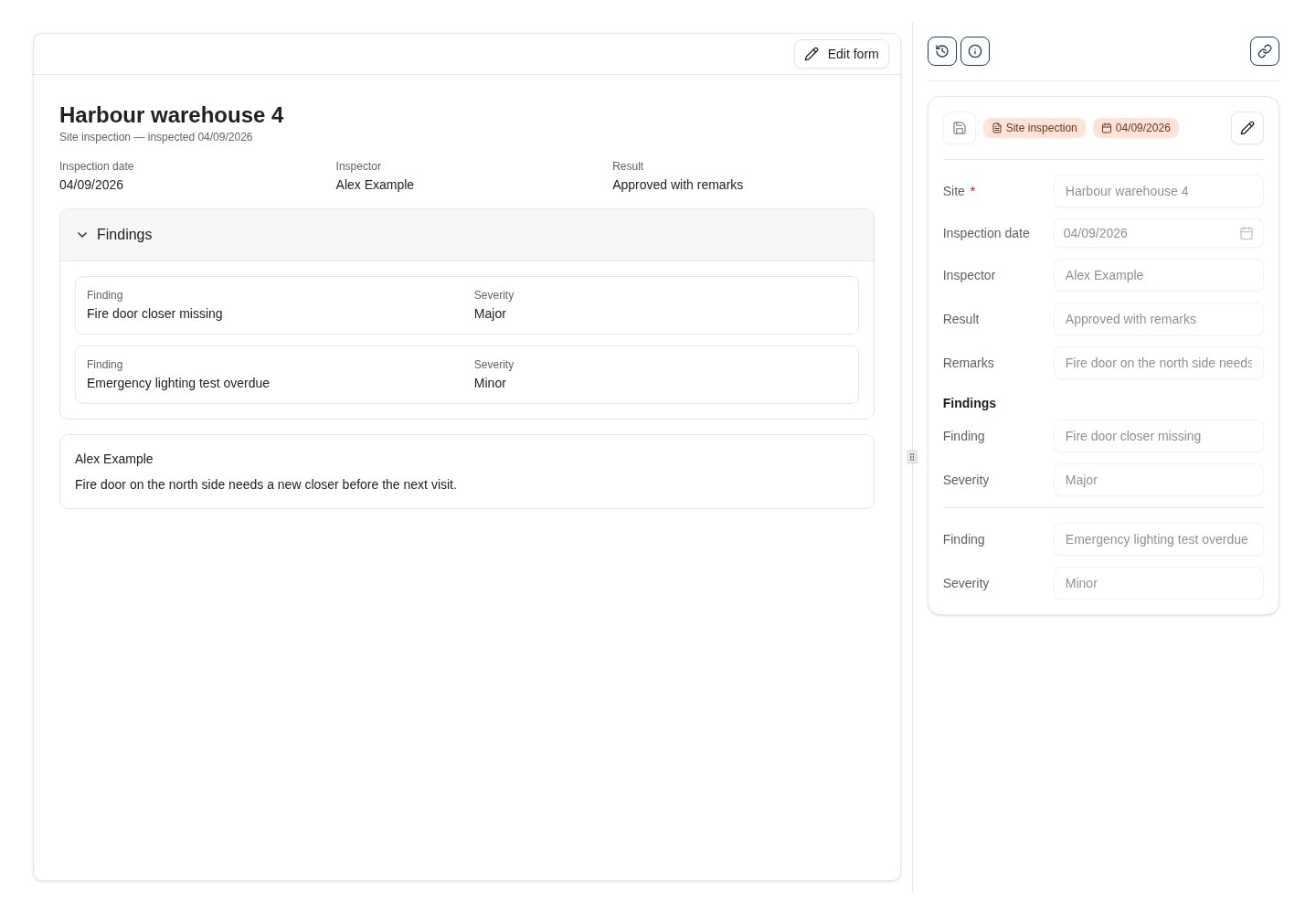
A **form document** is a document with no file behind it. Its content is its keywords: a site inspection, a customer enquiry, a change request — anything that is really a set of fields rather than a scanned page or an Office file. Nobly Insight stores it as a normal document of its document type, so search, keywords, access rights, history, retention and workflows all apply, and shows it through **form templates** you design in the product instead of a file viewer.
 ## When to use a form document
Use a form document when the thing you capture has no natural file:
* Structured records people fill in on screen — inspections, registrations, requests, checklists.
* Records that arrive from other systems as data and need a home with the document type's keywords, rights and history.
* Existing archives of keyword-only documents (for example, legacy electronic forms) that you want to keep reading and editing without their old form layout.
Keep using file documents for anything that is a file: PDFs, Office documents, e-mails, images. A form document never has a file, so file actions — download, open in Office, redaction, file revisions — do not apply to it.
## How it fits together
| Piece | Role |
| ------------------- | ------------------------------------------------------------------------------------------------------------------------------------------------------------------------------------------------------------------------------------ |
| **Document type** | A form document is a regular document of a document type. The type's [keyword configuration](/configuration/keyword-assignment-models) decides which keywords the form can hold; its access rights decide who may see and create it. |
| **Form templates** | HTML templates, designed per document type, that decide how a form document is shown, created and edited. There are three kinds — preview, create and update — see [form templates](/forms/templates). |
| **Form components** | The building blocks a template uses: fields, values, keyword groups, a save button and layout helpers. See the [component reference](/forms/components). |
| **Permissions** | Designing templates needs the **Form configuration** permissions; filling in a form needs the document type's creation and keyword rights. See [administration](/forms/administration). |
## What users see
* **Search** lists form documents like any other document. Their row shows a form icon instead of a file-type icon, and the search preview renders the type's preview template.
* **The viewer** shows the preview template in place of the file viewer, with the usual keyword panel, history, notes and actions on the side. **Edit form** switches to the update template for people who may modify keywords; the keyword panel stays as a read-only mirror while the form is being edited.
* **New form** in the sidebar opens the [dedicated create page](/how-tos/create-a-form-document) for the document types the user has a create template and creation rights for.
Everything a form saves goes through the same keyword rules as the keyword panel: required keywords, masks and lengths, datasets and cascading values, autofill sets, conditional keyword rules, restricted keywords and revision comments.
## Where to read next
Design the preview, create and update templates of a document type in the template designer.
The everyday task: open New form, pick a document type, fill in the form.
Permissions, which document types qualify, and how form documents behave across the product.
## When to use a form document
Use a form document when the thing you capture has no natural file:
* Structured records people fill in on screen — inspections, registrations, requests, checklists.
* Records that arrive from other systems as data and need a home with the document type's keywords, rights and history.
* Existing archives of keyword-only documents (for example, legacy electronic forms) that you want to keep reading and editing without their old form layout.
Keep using file documents for anything that is a file: PDFs, Office documents, e-mails, images. A form document never has a file, so file actions — download, open in Office, redaction, file revisions — do not apply to it.
## How it fits together
| Piece | Role |
| ------------------- | ------------------------------------------------------------------------------------------------------------------------------------------------------------------------------------------------------------------------------------ |
| **Document type** | A form document is a regular document of a document type. The type's [keyword configuration](/configuration/keyword-assignment-models) decides which keywords the form can hold; its access rights decide who may see and create it. |
| **Form templates** | HTML templates, designed per document type, that decide how a form document is shown, created and edited. There are three kinds — preview, create and update — see [form templates](/forms/templates). |
| **Form components** | The building blocks a template uses: fields, values, keyword groups, a save button and layout helpers. See the [component reference](/forms/components). |
| **Permissions** | Designing templates needs the **Form configuration** permissions; filling in a form needs the document type's creation and keyword rights. See [administration](/forms/administration). |
## What users see
* **Search** lists form documents like any other document. Their row shows a form icon instead of a file-type icon, and the search preview renders the type's preview template.
* **The viewer** shows the preview template in place of the file viewer, with the usual keyword panel, history, notes and actions on the side. **Edit form** switches to the update template for people who may modify keywords; the keyword panel stays as a read-only mirror while the form is being edited.
* **New form** in the sidebar opens the [dedicated create page](/how-tos/create-a-form-document) for the document types the user has a create template and creation rights for.
Everything a form saves goes through the same keyword rules as the keyword panel: required keywords, masks and lengths, datasets and cascading values, autofill sets, conditional keyword rules, restricted keywords and revision comments.
## Where to read next
Design the preview, create and update templates of a document type in the template designer.
The everyday task: open New form, pick a document type, fill in the form.
Permissions, which document types qualify, and how form documents behave across the product.