> ## Documentation Index
> Fetch the complete documentation index at: https://docs.insight.nobly.dk/llms.txt
> Use this file to discover all available pages before exploring further.
# Access and permissions
> Map your identity provider's groups to ContentFlow user groups, grant each group the permissions it needs, and review the audit trail.
People sign in to ContentFlow with the same identity provider as the rest of your Nobly Insight environment. What they can do there is decided by ContentFlow's own **user groups** and **permissions**, which are separate from the permissions in the Insight client. Granting someone an Insight permission does not give them any ContentFlow capability, and the reverse is also true.
## Prerequisites
You need `iam.user-groups.manage` to create user groups and `iam.permissions.manage` to grant permissions. The matching `view` permissions let you inspect both without changing them.
## How a person gets access
The person is a member of a group in your identity provider, for example `ContentFlow Administrators`.
Under **User groups**, a group with the same name exists. When the person signs in, ContentFlow matches the group names their identity provider sends against these user groups.
Under **Permissions**, the user group holds the permissions for the work the person does. Someone in several groups gets the combination of all their groups' permissions.
Membership itself is managed in the identity provider; ContentFlow does not store members. To remove someone's access, remove them from the identity provider group. The change takes effect when they next sign in.
## Create a user group
Open **User groups** and choose the **+** button. In **New User Group**, enter the **User group name** exactly as your identity provider names the group, and a **Description** of who belongs in it. A new group has no permissions until you grant them.
## Grant permissions
Open **Permissions**. The page has three tabs:
* **Matrix** shows every permission as a row and every user group as a column, grouped by area. A cell that is granted through a broader permission is dimmed and says which grant includes it.
* **By group** shows one group's permissions as a list of checkboxes. Use it when you set up a new group.
* **Audit** shows who granted or revoked what, when, and why, for the last 60 days.
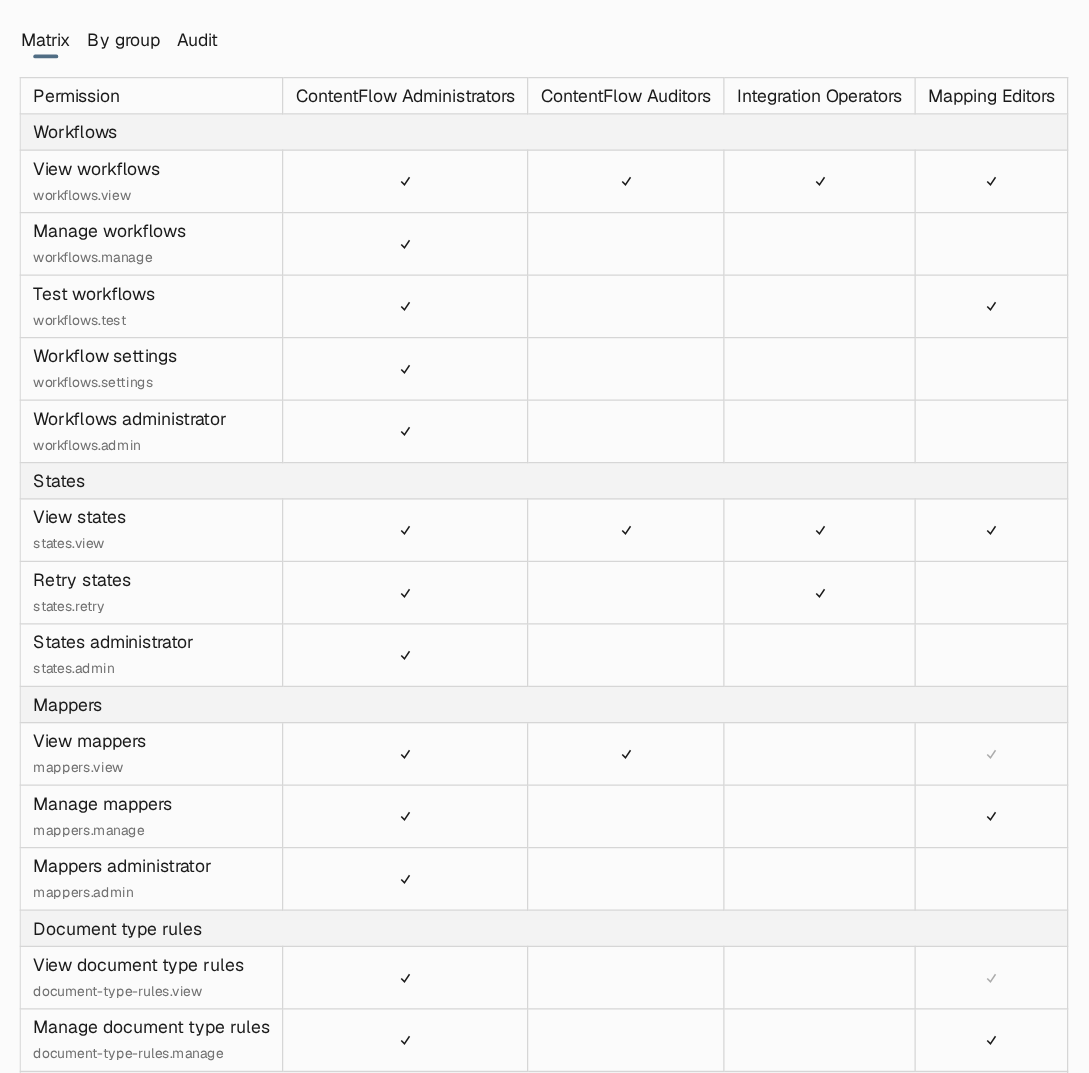 Changes are staged. Tick and untick cells, check the summary of grants and revokes at the bottom, add a **Reason**, and choose **Save**. **Discard** drops the staged changes. A reason is recommended for every revoke: it is kept in the audit trail.
The last user group holding `iam.permissions.manage` cannot lose it, so ContentFlow always keeps someone who can administer permissions.
## Permission catalogue
| Area | Permission | Allows |
| - | - | - |
| Workflows | `workflows.view` | See workflows, their versions and the editor |
| | `workflows.manage` | Create, edit, validate, publish, restore and delete workflows |
| | `workflows.test` | Create and run workflow tests and their sample files |
| | `workflows.settings` | Change per-workflow settings |
| | `workflows.admin` | Everything under workflows |
| States | `states.view` | See runs, batches and their logs |
| | `states.retry` | Rerun failed runs, one at a time or in bulk |
| | `states.admin` | Everything under states |
| Mappers | `mappers.view` | See document mappings and classic mappers, try them, and use the Nobly Insight lookups |
| | `mappers.manage` | Create, edit, publish and delete document mappings and classic mappers |
| | `mappers.admin` | Everything under mappers |
| Document type rules | `document-type-rules.view` | See shared lookup tables and rule sets |
| | `document-type-rules.manage` | Create, edit and delete shared lookup tables and rule sets |
| Global variables | `global-variables.view` | See global variables; secret values stay hidden |
| | `global-variables.manage` | Create, edit and delete global variables |
| System | `system.view` | See global and per-workflow system settings |
| | `system.manage` | Change system settings and clear caches |
| Playground | `playground.view` | Use the expression tester and the editor's code completion and compile checks |
| Access control | `iam.user-groups.view` | See user groups |
| | `iam.user-groups.manage` | Create, edit and delete user groups |
| | `iam.permissions.view` | See the permission catalogue, grants and audit trail |
| | `iam.permissions.manage` | Grant and revoke permissions |
A `manage` permission includes `view` in the same area, and an `admin` permission includes every permission in its area. `workflows.test`, `workflows.settings` and `states.retry` are separate grants: `workflows.manage` does not include them, and `states.retry` does not include `states.view`.
`workflows.manage` and `mappers.manage` let a person put C# code into live runs: workflow expressions and expression rows in mappings. That code runs with the environment's own identity and can read secret global variables. Grant these permissions as you would administrative access to the integrations ContentFlow connects to.
## Typical groups
| Group | Grant | Purpose |
| - | - | - |
| Administrators | `workflows.admin`, `mappers.admin`, `states.admin`, `document-type-rules.manage`, `global-variables.manage`, `system.manage`, `playground.view`, `iam.user-groups.manage`, `iam.permissions.manage` | Build and run everything, and manage access |
| Mapping editors | `mappers.manage`, `document-type-rules.manage`, `workflows.view`, `workflows.test`, `states.view`, `playground.view` | Maintain mappings and lookup tables, and test them in workflows, without publishing workflows |
| Operators | `states.view`, `states.retry`, `workflows.view` | Follow runs, read logs and rerun failures after a fix |
| Auditors | `workflows.view`, `mappers.view`, `states.view`, `iam.user-groups.view`, `iam.permissions.view` | Review configuration and access without changing anything |
A mapping editor in this example can publish mappings, which changes what every workflow using them sends. If mapping changes need a second pair of eyes, grant `mappers.view` and `workflows.test` instead, and let a smaller group publish.
## Where to read next
What a sending system delivers to ContentFlow, and how to confirm that an item was processed.
This documentation is built and hosted on [Mintlify](https://mintlify.com), a developer documentation platform.
Changes are staged. Tick and untick cells, check the summary of grants and revokes at the bottom, add a **Reason**, and choose **Save**. **Discard** drops the staged changes. A reason is recommended for every revoke: it is kept in the audit trail.
The last user group holding `iam.permissions.manage` cannot lose it, so ContentFlow always keeps someone who can administer permissions.
## Permission catalogue
| Area | Permission | Allows |
| - | - | - |
| Workflows | `workflows.view` | See workflows, their versions and the editor |
| | `workflows.manage` | Create, edit, validate, publish, restore and delete workflows |
| | `workflows.test` | Create and run workflow tests and their sample files |
| | `workflows.settings` | Change per-workflow settings |
| | `workflows.admin` | Everything under workflows |
| States | `states.view` | See runs, batches and their logs |
| | `states.retry` | Rerun failed runs, one at a time or in bulk |
| | `states.admin` | Everything under states |
| Mappers | `mappers.view` | See document mappings and classic mappers, try them, and use the Nobly Insight lookups |
| | `mappers.manage` | Create, edit, publish and delete document mappings and classic mappers |
| | `mappers.admin` | Everything under mappers |
| Document type rules | `document-type-rules.view` | See shared lookup tables and rule sets |
| | `document-type-rules.manage` | Create, edit and delete shared lookup tables and rule sets |
| Global variables | `global-variables.view` | See global variables; secret values stay hidden |
| | `global-variables.manage` | Create, edit and delete global variables |
| System | `system.view` | See global and per-workflow system settings |
| | `system.manage` | Change system settings and clear caches |
| Playground | `playground.view` | Use the expression tester and the editor's code completion and compile checks |
| Access control | `iam.user-groups.view` | See user groups |
| | `iam.user-groups.manage` | Create, edit and delete user groups |
| | `iam.permissions.view` | See the permission catalogue, grants and audit trail |
| | `iam.permissions.manage` | Grant and revoke permissions |
A `manage` permission includes `view` in the same area, and an `admin` permission includes every permission in its area. `workflows.test`, `workflows.settings` and `states.retry` are separate grants: `workflows.manage` does not include them, and `states.retry` does not include `states.view`.
`workflows.manage` and `mappers.manage` let a person put C# code into live runs: workflow expressions and expression rows in mappings. That code runs with the environment's own identity and can read secret global variables. Grant these permissions as you would administrative access to the integrations ContentFlow connects to.
## Typical groups
| Group | Grant | Purpose |
| - | - | - |
| Administrators | `workflows.admin`, `mappers.admin`, `states.admin`, `document-type-rules.manage`, `global-variables.manage`, `system.manage`, `playground.view`, `iam.user-groups.manage`, `iam.permissions.manage` | Build and run everything, and manage access |
| Mapping editors | `mappers.manage`, `document-type-rules.manage`, `workflows.view`, `workflows.test`, `states.view`, `playground.view` | Maintain mappings and lookup tables, and test them in workflows, without publishing workflows |
| Operators | `states.view`, `states.retry`, `workflows.view` | Follow runs, read logs and rerun failures after a fix |
| Auditors | `workflows.view`, `mappers.view`, `states.view`, `iam.user-groups.view`, `iam.permissions.view` | Review configuration and access without changing anything |
A mapping editor in this example can publish mappings, which changes what every workflow using them sends. If mapping changes need a second pair of eyes, grant `mappers.view` and `workflows.test` instead, and let a smaller group publish.
## Where to read next
What a sending system delivers to ContentFlow, and how to confirm that an item was processed.
This documentation is built and hosted on [Mintlify](https://mintlify.com), a developer documentation platform.