> ## Documentation Index
> Fetch the complete documentation index at: https://docs.insight.nobly.dk/llms.txt
> Use this file to discover all available pages before exploring further.
# Document access rights
> Grant user groups the privileges to view, create, modify, delete, and otherwise work with documents of each document type.
## What document access rights control
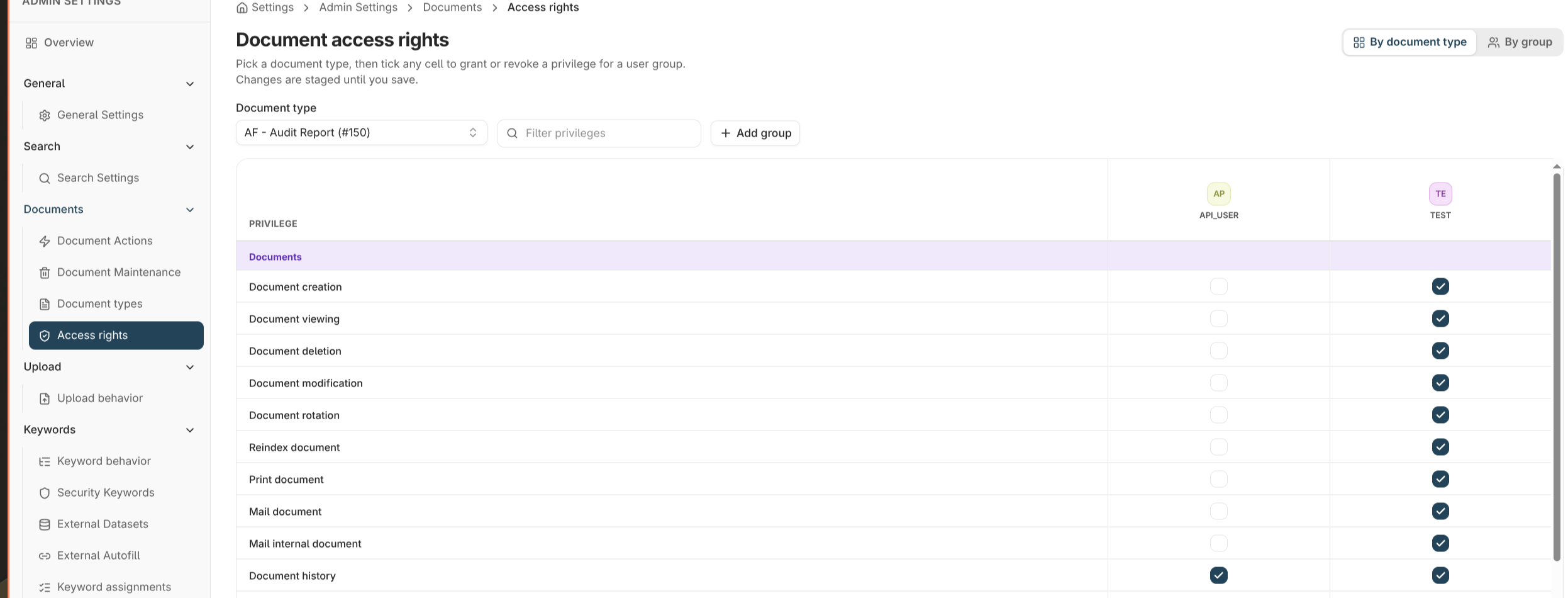
Document access rights decide what each **user group** can *do* with documents of a given **document type** — view them, create them, modify keywords, delete, print, mail, manage revisions, and more. They are the layer that governs day-to-day work with documents, granted per document type and per user group.
Document access rights are different from **[application permissions](/permissions/application-permissions)**. Application permissions decide who can use the *admin and configuration screens*; document access rights decide what users can do with *documents themselves*. A user typically needs the right document access rights to do their job, and only administrators need application permissions. See [Permissions & access](/permissions/introduction) for the full model.
You manage them under **Admin settings → Documents → Access rights** (open **Admin settings** from your profile menu at the bottom-left of the sidebar). Edit them two ways:
* **By document type** — pick a type and set every group's privileges on it.
* **By group** — pick a user group and see, across all document types, what it can do.
 ## The privileges
Privileges are grouped into three categories. Grant only what each group needs.
### Documents
| Privilege | Allows |
| ------------------------ | ---------------------------------------------------------------- |
| **View** | Open and read documents of this type. |
| **Create** | Upload and index new documents. |
| **Modify** | Change document content. |
| **Delete** | Remove documents. |
| **Rotate** | Rotate document pages. |
| **Re-index** | Move a document to a different type or change its core indexing. |
| **Print** | Print documents. |
| **Mail / Mail internal** | Send documents externally or to internal users. |
| **Document history** | See a document's activity history. |
| **Copy to clipboard** | Copy document content out. |
| **Create reference** | Create references to the document. |
### Keywords
| Privilege | Allows |
| ------------------------------ | ----------------------------------------------- |
| **View keywords** | See the document's keyword values. |
| **Modify keywords** | Change keyword values. |
| **Access restricted keywords** | View and edit keywords protected as restricted. |
### Revisions & versions
| Privilege | Allows |
| ----------------------------- | ------------------------------------------ |
| **Revision control** | Work with the document's revision history. |
| **Create / delete revisions** | Add or remove revisions. |
| **View versions** | See document versions. |
| **Create versions** | Create new versions. |
## Granting access
1. Open **Admin settings → Documents → Access rights** and choose the **by document type** or **by group** view.
2. Select the document type (or group) to edit.
3. Tick the privileges each group should have. Changes are held as a **draft**.
4. **Save** to apply, or **Discard** to revert.
### Bulk grant
To give a group a common set of privileges across **many document types** at once, use **Bulk grant**. Pick a privilege set — for example a *read-only* or *contributor* preset — and apply it to several types in one action, instead of editing each type individually.
Start from the least privilege that lets a group work — typically **View** and **View keywords** — and add more deliberately. It's easier to widen access later than to discover it was too broad.
## Where to read next
How document access rights fit into the wider access model alongside application permissions and security keywords.
The document types whose access you're granting.
## The privileges
Privileges are grouped into three categories. Grant only what each group needs.
### Documents
| Privilege | Allows |
| ------------------------ | ---------------------------------------------------------------- |
| **View** | Open and read documents of this type. |
| **Create** | Upload and index new documents. |
| **Modify** | Change document content. |
| **Delete** | Remove documents. |
| **Rotate** | Rotate document pages. |
| **Re-index** | Move a document to a different type or change its core indexing. |
| **Print** | Print documents. |
| **Mail / Mail internal** | Send documents externally or to internal users. |
| **Document history** | See a document's activity history. |
| **Copy to clipboard** | Copy document content out. |
| **Create reference** | Create references to the document. |
### Keywords
| Privilege | Allows |
| ------------------------------ | ----------------------------------------------- |
| **View keywords** | See the document's keyword values. |
| **Modify keywords** | Change keyword values. |
| **Access restricted keywords** | View and edit keywords protected as restricted. |
### Revisions & versions
| Privilege | Allows |
| ----------------------------- | ------------------------------------------ |
| **Revision control** | Work with the document's revision history. |
| **Create / delete revisions** | Add or remove revisions. |
| **View versions** | See document versions. |
| **Create versions** | Create new versions. |
## Granting access
1. Open **Admin settings → Documents → Access rights** and choose the **by document type** or **by group** view.
2. Select the document type (or group) to edit.
3. Tick the privileges each group should have. Changes are held as a **draft**.
4. **Save** to apply, or **Discard** to revert.
### Bulk grant
To give a group a common set of privileges across **many document types** at once, use **Bulk grant**. Pick a privilege set — for example a *read-only* or *contributor* preset — and apply it to several types in one action, instead of editing each type individually.
Start from the least privilege that lets a group work — typically **View** and **View keywords** — and add more deliberately. It's easier to widen access later than to discover it was too broad.
## Where to read next
How document access rights fit into the wider access model alongside application permissions and security keywords.
The document types whose access you're granting.