> ## Documentation Index
> Fetch the complete documentation index at: https://docs.insight.nobly.dk/llms.txt
> Use this file to discover all available pages before exploring further.
# Group mappings and kept differences
> Point user group names from other environments at the groups in this environment, and record the differences this environment keeps on purpose.
The **Rules** tab of **Configuration promotion** holds two lists. Both are stored in the environment you are in and shape every later import there:
* **User group reference rules** say which group in this environment a user group name from another environment means.
* **Kept different in this environment** records configuration this environment holds differently on purpose, so a promotion stops offering to change it.
Changing either list while an import is open refreshes its preview.
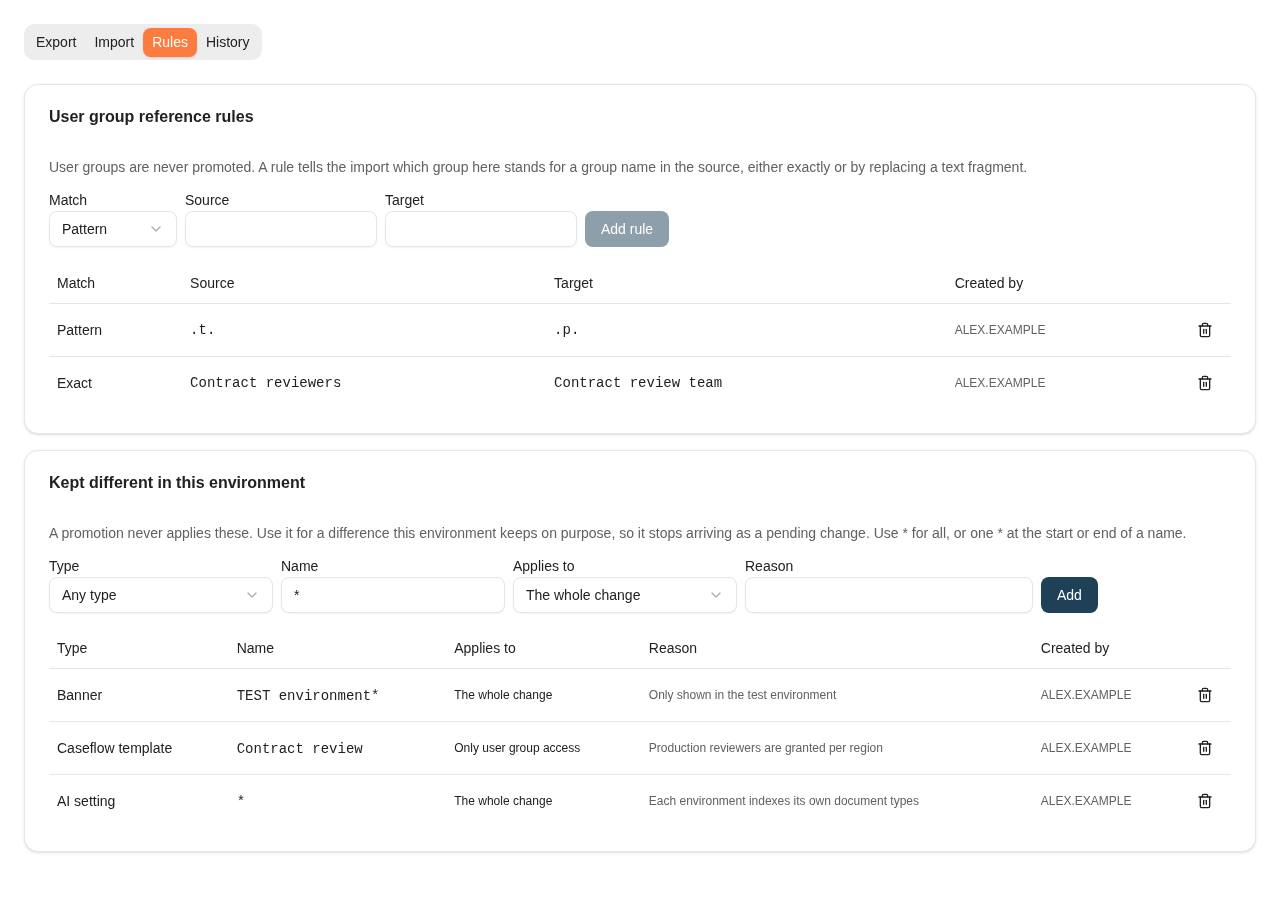 ## User group reference rules
A promotion never creates, copies or renames user groups, because each environment manages its own. Environments often name the same group differently, for example `acl.t.Claims` in test and `acl.p.Claims` in production. A reference rule tells this environment which of its groups a name from the export file means.
When an import meets a user group name, it resolves it in this order:
1. **A group here with the same name** always wins, ignoring upper and lower case. No rule is needed, and no rule overrides it.
2. **Exact rules** replace a name that matches the rule's source value as a whole, ignoring case.
3. **Pattern rules** replace a text fragment. When a name contains the source value, every occurrence is replaced with the target value, ignoring case.
Rules with a longer source value are tried first. The result must be a group that exists here; if it does not, the change stays blocked.
| Match | Source | Target | Effect |
| ----------- | -------------------- | ---------------------- | -------------------------------------------------------------------------------------- |
| **Pattern** | `.t.` | `.p.` | `acl.t.Claims` becomes `acl.p.Claims`, and `acl.t.Contracts` becomes `acl.p.Contracts` |
| **Exact** | `Contract reviewers` | `Contract review team` | Only that name is mapped |
Add a rule on the **Rules** tab by choosing **Match**, entering **Source** and **Target**, and selecting **Add rule**. You can also accept a proposal from the dialog that opens during an import; see [Map user groups](/configuration-promotion/promoting-configuration#map-user-groups). Remove a rule with **Remove rule**.
Adding and removing rules needs **Manage user groups** in addition to **Keyword configuration administration**. Without it, the rules are shown but cannot be changed.
A rule points at whatever existing group it lands on, and the promotion grants that group the rights in the file. Before each apply, check **Group mappings used by this plan** on the review. History keeps the mappings each promotion used.
Two situations block a change until the rules are fixed:
* **A name maps to more than one group here**, for example because an exact rule and a pattern rule give different results. Remove one of the rules.
* **Two groups from the source map to the same group here with different rights on the same configuration.** Map them to different groups, or give them the same rights in the source.
## Kept different in this environment
Use this list for a difference this environment keeps on purpose. Examples are a banner shown only in test, an automatic indexing choice for AI search, or a template that production grants to different groups. A promotion never applies a matching change. The review still lists it under **changes are kept different in this environment**, with your reason, so the difference stays visible.
Each entry has four fields:
| Field | What to enter |
| -------------- | ------------------------------------------------------------------------------------------------------------------------------------------------------------------------------------------------------------------------------------------------------------------------------------------------ |
| **Type** | A configuration type, or **Any type** |
| **Name** | The name as the review shows it. `*` matches everything, `Contract*` matches names that start with *Contract*, `*agreement` matches names that end with *agreement*, and `*contract*` matches names that contain it. Without `*`, the name must match exactly. Upper and lower case are ignored. |
| **Applies to** | **The whole change**, or **Only user group access** |
| **Reason** | Why this environment differs. It is shown on the review. |
Names are those the review shows. For example, a Caseflow class is named *Application/Class*, and a banner is named by its message text. Select **Stop keeping this different** to remove an entry.
Adding and removing entries needs permission to change and delete the type concerned. For an entry that applies to **Any type**, you need that permission for every type.
### The whole change
Matching creates, updates and deletes are never ticked. Other changes that depend on a kept difference are held back too:
* A change that needs a kept **update** is blocked.
* A change that needs a kept **create** is left out, with the reason on the row.
### Only user group access
The rest of the configuration is promoted, and this environment keeps its own list of user groups for it. For templates, it also keeps the precedence. The row on the review says that user group access is not promoted for this change.
## User group reference rules
A promotion never creates, copies or renames user groups, because each environment manages its own. Environments often name the same group differently, for example `acl.t.Claims` in test and `acl.p.Claims` in production. A reference rule tells this environment which of its groups a name from the export file means.
When an import meets a user group name, it resolves it in this order:
1. **A group here with the same name** always wins, ignoring upper and lower case. No rule is needed, and no rule overrides it.
2. **Exact rules** replace a name that matches the rule's source value as a whole, ignoring case.
3. **Pattern rules** replace a text fragment. When a name contains the source value, every occurrence is replaced with the target value, ignoring case.
Rules with a longer source value are tried first. The result must be a group that exists here; if it does not, the change stays blocked.
| Match | Source | Target | Effect |
| ----------- | -------------------- | ---------------------- | -------------------------------------------------------------------------------------- |
| **Pattern** | `.t.` | `.p.` | `acl.t.Claims` becomes `acl.p.Claims`, and `acl.t.Contracts` becomes `acl.p.Contracts` |
| **Exact** | `Contract reviewers` | `Contract review team` | Only that name is mapped |
Add a rule on the **Rules** tab by choosing **Match**, entering **Source** and **Target**, and selecting **Add rule**. You can also accept a proposal from the dialog that opens during an import; see [Map user groups](/configuration-promotion/promoting-configuration#map-user-groups). Remove a rule with **Remove rule**.
Adding and removing rules needs **Manage user groups** in addition to **Keyword configuration administration**. Without it, the rules are shown but cannot be changed.
A rule points at whatever existing group it lands on, and the promotion grants that group the rights in the file. Before each apply, check **Group mappings used by this plan** on the review. History keeps the mappings each promotion used.
Two situations block a change until the rules are fixed:
* **A name maps to more than one group here**, for example because an exact rule and a pattern rule give different results. Remove one of the rules.
* **Two groups from the source map to the same group here with different rights on the same configuration.** Map them to different groups, or give them the same rights in the source.
## Kept different in this environment
Use this list for a difference this environment keeps on purpose. Examples are a banner shown only in test, an automatic indexing choice for AI search, or a template that production grants to different groups. A promotion never applies a matching change. The review still lists it under **changes are kept different in this environment**, with your reason, so the difference stays visible.
Each entry has four fields:
| Field | What to enter |
| -------------- | ------------------------------------------------------------------------------------------------------------------------------------------------------------------------------------------------------------------------------------------------------------------------------------------------ |
| **Type** | A configuration type, or **Any type** |
| **Name** | The name as the review shows it. `*` matches everything, `Contract*` matches names that start with *Contract*, `*agreement` matches names that end with *agreement*, and `*contract*` matches names that contain it. Without `*`, the name must match exactly. Upper and lower case are ignored. |
| **Applies to** | **The whole change**, or **Only user group access** |
| **Reason** | Why this environment differs. It is shown on the review. |
Names are those the review shows. For example, a Caseflow class is named *Application/Class*, and a banner is named by its message text. Select **Stop keeping this different** to remove an entry.
Adding and removing entries needs permission to change and delete the type concerned. For an entry that applies to **Any type**, you need that permission for every type.
### The whole change
Matching creates, updates and deletes are never ticked. Other changes that depend on a kept difference are held back too:
* A change that needs a kept **update** is blocked.
* A change that needs a kept **create** is left out, with the reason on the row.
### Only user group access
The rest of the configuration is promoted, and this environment keeps its own list of user groups for it. For templates, it also keeps the precedence. The row on the review says that user group access is not promoted for this change.
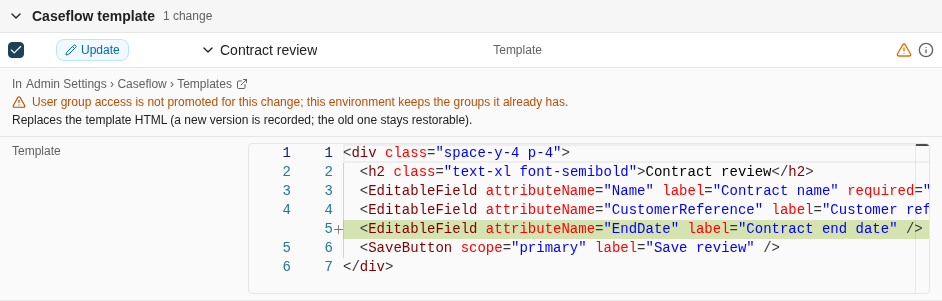 **Only user group access** applies to configuration that has its own list of groups:
* document types, through their access rights
* Caseflow classes
* Caseflow and form templates
* autofill keyword sets
* custom document actions
* folder trees
* shared saved searches and their folders
* dashboards
* retention policies, whose groups are the approvers
For other configuration, such as permission grants, feature controls and security keyword rules, the configuration exists only to bind groups. To keep those different, use **The whole change**.
When a new entry arrives with its access kept, it is created without user groups. A new template without groups would be open to every user, so it is blocked. Types that need at least one group, such as folder trees, are blocked by their own rules. Create the entry in this environment first, or promote it with its access.
## Where to read next
See every promotion applied to an environment, what it changed, and what has changed since.
Maintain the user groups each environment manages for itself.
**Only user group access** applies to configuration that has its own list of groups:
* document types, through their access rights
* Caseflow classes
* Caseflow and form templates
* autofill keyword sets
* custom document actions
* folder trees
* shared saved searches and their folders
* dashboards
* retention policies, whose groups are the approvers
For other configuration, such as permission grants, feature controls and security keyword rules, the configuration exists only to bind groups. To keep those different, use **The whole change**.
When a new entry arrives with its access kept, it is created without user groups. A new template without groups would be open to every user, so it is blocked. Types that need at least one group, such as folder trees, are blocked by their own rules. Create the entry in this environment first, or promote it with its access.
## Where to read next
See every promotion applied to an environment, what it changed, and what has changed since.
Maintain the user groups each environment manages for itself.